
🚀 Early access — free until release, no limits and no card required.
Goods receipt → Reservation → Shipment
Inventory management that knows how much stock you can ship
Stock, reservations and batches across all warehouses and companies — in the same OneB account where you issue invoices.
 Stock and reserved
 Batches by purchase price
 Target stock level
 Stock count by scanner
We will migrate your data from other systems for free
Early Access — free until release • No payment card required
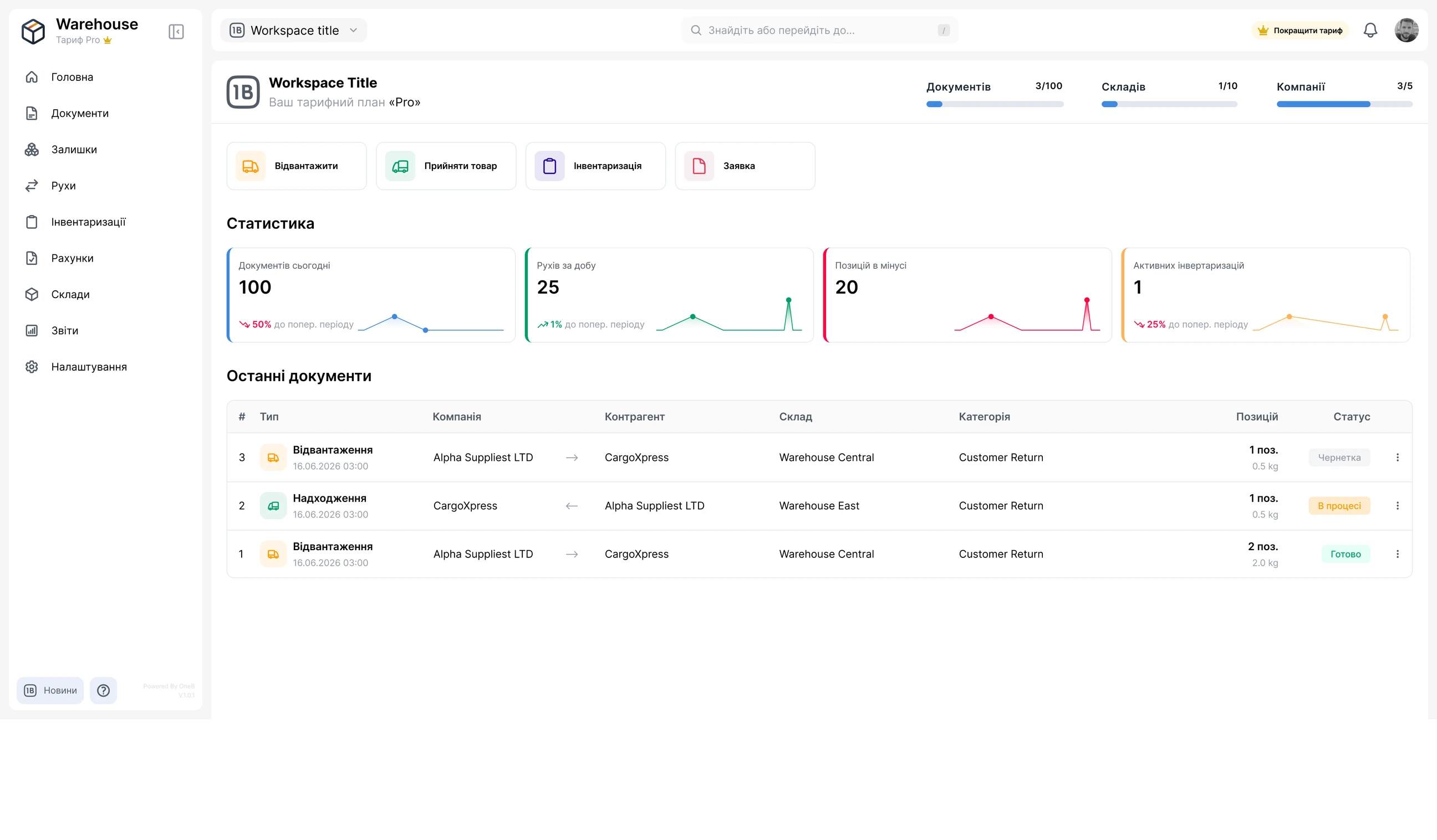
Inventory in Excel — surprises every day
While stock lives in spreadsheets and orders in messengers, you find out about shortages when the customer is already waiting.
Sold what you don’t have
The spreadsheet says it’s in stock, but it was already promised to another customer. Apologies, refunds and a lost customer.
Stock counts over the weekend
A manual recount takes days, and discrepancies have to be hunted down row by row.
Money sitting on shelves
Too much of some items, not enough of others. You only see what to reorder when it’s too late.
Who wrote it off? Nobody knows
The office, warehouse and sales each keep their own files. Who changed the stock and when is impossible to trace.
How OneB Warehouse works
Every completed document creates a stock movement, and stock and stock cards are calculated from movements automatically.
- Step 1
Add warehouses and products
Fill in the directories once — after that, every document picks them up.
 Multiple companies and warehousesSeveral legal entities, a warehouse and a shop — in one workspace
- Products with SKU and barcodeCategories with subcategories — a filter in stock, movements and stock cards
- 20 units of measurePiece, kg, m³, box, pallet, roll, set…
- Clients and suppliersCounterparties for incoming and outgoing documents
- Step 2
Record a goods receipt
A document in 2 steps: first the company, counterparty, warehouse and date, then the items.
- Items from the catalog or by scannerSeveral products at once
- “In progress” — goods in transitThey show up in stock cards before they reach the warehouse
- “Done” — stock goes upThe batch with its purchase price goes into stock cards
- Ready-made operationsReceipt from a supplier, return from a client
- Step 3
Ship with reservation
Goods for an order are reserved as soon as the outgoing document moves to “In progress”.
- Shipment requestFulfillment is tracked by quantity
- Reserved instead of “in stock”Reserved goods won’t be sold twice
- Shipment, write-off, transferBetween warehouses — with one document
- A document based on anotherRelated documents — in one chain
- Step 4
See stock and stock levels
Stock is calculated from completed documents — nobody changes it by hand.
- Quantity, reserved and availableAcross the workspace, a company or a warehouse
- Target and stock levelCritical, low, normal, excess
- Stock count by scannerDiscrepancies are calculated automatically — then “Create adjustment”
- Stock on a date and action historyThe picture for any day and who changed what
The system tells you when it’s time to reorder
Set a target stock level — OneB Warehouse compares stock with it and highlights the level in color. Shortages and frozen money are one filter away.
Critical < 15%
almost out of stock — time to reorder
Low 15–60%
worth restocking soon
Normal 60–140%
everything is fine
Excess ≥ 140%
more stock than you need — money is frozen in inventory
- Vanilla syrup 1 L8%
- Coffee filters No. 450%
- Coffee beans 1 kg96%
- Steel thermos 0.5 L175%
You set the target yourself — right in the stock cards table. Without a target, no level is shown.
Stock counts without notebooks or Excel
Scan barcodes — OneB Warehouse compares the actual quantity with the system quantity and shows the discrepancies.
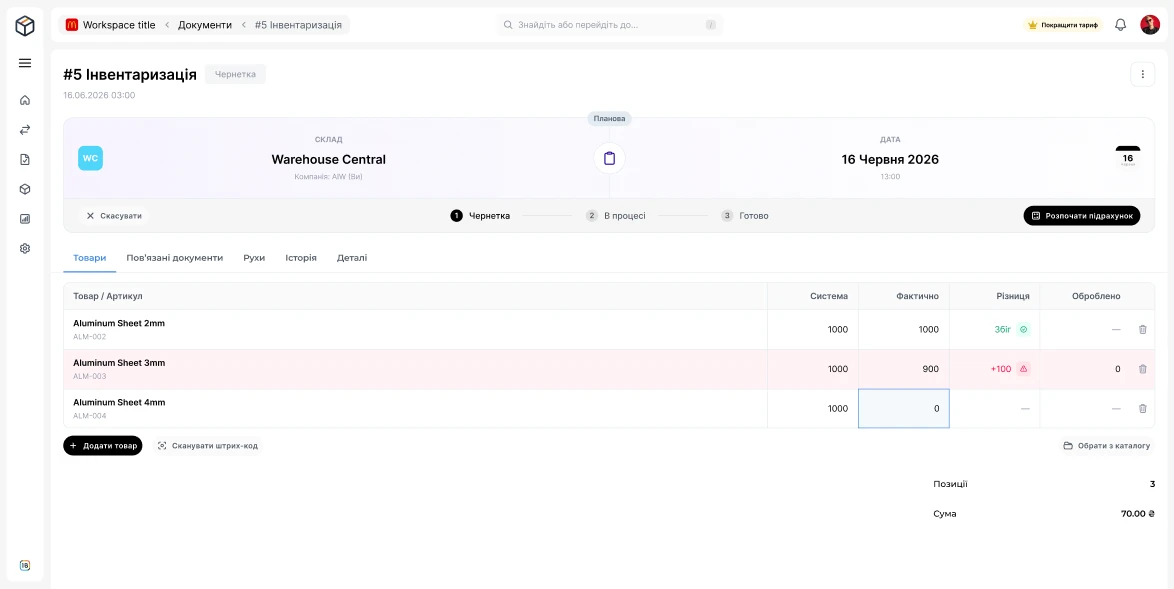
A recount in hours,not days
A stock count is a separate warehouse document with statuses Draft → In progress → Done.
- 1Create a stock count for a warehouse
- 2Scan barcodes or add products from the catalog
- 3The difference between system and actual quantity is calculated automatically
- 4Discrepancies are closed with an adjustment — and stock matches reality
More possibilities
Everything that simplifies the daily work of a warehouse

Stock and reserved
Quantity, reserved and available — by company, warehouse or the whole workspace

Batches by purchase price
The same product at different prices — separate stock cards

Goods in transit
Active goods receipts are visible before they reach the warehouse

Stock count by scanner
Discrepancies are calculated automatically, then — an adjustment

Transfers between warehouses
Goods move between warehouses with one document
Requests and related documents
Supply, picking and shipment requests with fulfillment tracking

Stock on a date
A picture of your warehouse on any day in the past

Action history and roles
Who changed what and when; everyone sees their own

Notifications
About new and changed documents — on the website, by email and in Telegram
Who OneB Warehouse is for
Small and medium product businesses that keep stock in Excel or a notebook and already issue invoices and delivery notes.
Online stores
See not just “in stock” but how much you can ship: request → reservation → shipment.
Wholesale and distribution
Several warehouses, batches at different purchase prices and transfers between warehouses.
Retail and small chains
Barcode stock counts instead of a notebook and target stock levels for fast-moving items.
Manufacturing
Kitting and supply requests, write-offs of materials.
Construction and renovation
Materials don’t “leak” across sites: requests, write-offs, units like m³, m², pallet, roll.
Several legal entities
All your companies in one workspace — stock is visible for each of them.
Questions and Answers
We will try to answer briefly the most popular questions about our service
OneB Ecosystem
A comprehensive solution for managing all aspects of your business




OneB Warehouse for free
The service is currently in beta and completely free

Your data is securely protected on the Google Cloud cloud platform, and all information is stored in accordance with international information protection standards such as ISO 27001 and ISO 27701.
Sign Up For Free


© 2026 All rights reserved

Glory to Ukraine
Development of AIW Systems